
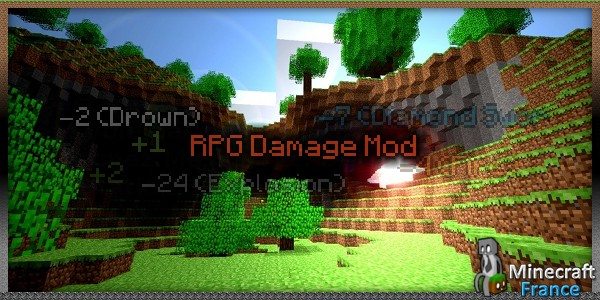
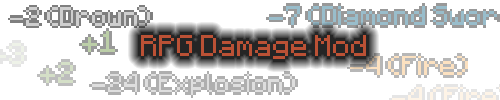
Si vous voulez que Minecraft ressemble un peu plus à un jeu RPG, testez RPGDamage qui affichera les dégâts subits tout simplement.
Utilisation :
Vous pourrez aussi configurer totalement le mod , par exemple :
- Changer la couleur des dégâts affichés
- Activer/désactiver des dégâts affichés
- Activer / désactiver le mod
Pour modifier le mod, il suffit de ce rendre dans .minecraft / config /
Voici le fichier que vous devriez trouver :
Fichier configurable
[/size][/size][/size][size="2"]### Splash mod 0.1a ###
# Written on Fri Jan 06 10:54:12 CET 2012

# Lines starting with # mean comment lines, DO NOT EDIT THEM, it won't do anything.

## Effect properties
# The main value toggles whether the particle should be called at all
# (With only the main value enabled you will only get the damage output without
# the source of the damage, which is the second value). Second value toggles if
# the effect should be visible on the particle. Example with both values true:
# "-3 (Cactus)". Example with main value true and secondary value false: "-3". All
# values are true by default. Options: true and false.
# toggleMain turns on and off the mod, true by default.
toggleCactusMain=true
toggleCactusSecondary=true
toggleFireMain=true
toggleFireSecondary=true
toggleFallMain=true
toggleFallSecondary=true
toggleDrownMain=true
toggleDrownSecondary=true
toggleHealingMain=true
toggleHealingSecondary=true
toggleExplosionMain=true
toggleExplosionSecondary=true
toggleMagicMain=true
toggleMagicSecondary=true
toggleMobMain=true
toggleMobSecondary=true
toggleStarvationMain=true
toggleStarvationSecondary=true
toggleArrowMain=true
toggleArrowSecondary=true
toggleMeleeMain=true
toggleMeleeSecondary=true
toggleGenericMain=true
toggleGenericSecondary=true
toggleMain=true

## Name properties
# These strings represent what the source of damage is.
nameCactus=Cactus
nameFire=Fire
nameFall=Fall
nameDrown=Drowning
nameHealing=Heal
nameExplosion=Explosion
nameMagic=Magic
nameStarve=Starvation
nameArrow=Arrow
nameMelee=Melee
nameGeneric=Generic
nameMob=Mob

## Color properties
# Foreground colors change the color of the
# frontmost number in the middle. Background colors change
# the color surrounding the middle one. To get colors for
# the color format used, check out www.colorpicker.com
cactusForegroundColor=bebebe
cactusBackgroundColor=0
fireForegroundColor=ff7f00
fireBackgroundColor=0
fallForegroundColor=bebebe
fallBackgroundColor=0
drownForegroundColor=bebebe
drownBackgroundColor=0
explosionForegroundColor=fe2712
explosionBackgroundColor=0
magicForegroundColor=a020f0
magicBackgroundColor=0
starveForegroundColor=bebebe
starveBackgroundColor=0
meleeForegroundColor=fe2712
meleeBackgroundColor=0
healingForegroundColor=a550
healingBackgroundColor=0
arrowForegroundColor=fe2712
arrowBackgroundColor=0
genericForegroundColor=bebebe
genericBackgroundColor=0
mobForegroundColor=fe2712
mobBackgroundColor=0

## Misc properties
# maxAge decides how long the particle should be alive.
# maxAge uses "ticks", there are 20 ticks per second.
# gravity decides how the particle should act after it
# joins the world. The particle's Y-axis multiplies the
# gravity value, so a value of "0.9" would make it
# gradually decrease. renderDistance decides at what distance
# the particle should be rendered at. It is measured in blocks.
maxAge=120
renderDistance=30
gravity=0.9800000190734863
Attention :
[badlist]
- Le mod ne fonctionne pas sur un serveur.
[/badlist]
Voici une vidéo en anglais présentant le mod :
[youtube id= »srEsRgqrsx8″ width= »600″ height= »350″]
Téléchargement :
Installation
Il est nécessaire de posséder Winrar ou 7-zip pour ouvrir les fichiers. Ouvrez ensuite Minecraft.exe, cliquez sur options et cliquez sur ce lien :
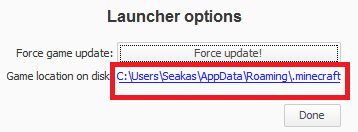
Ensuite ouvrez le dossier Bin et avec Winrar ou 7-zip ouvrez Minecraft.jar Supprimez le dossier META-INF.
Téléchargez RPGDamage et Modloader puis glissez leurs contenus dans Minecraft.jar


J’ai vu la vidéo en anglais, mais vu les voix assez énervantes des commentateurs, j’ai décidé d’en faire une moi :)
Voici le lien:
http://www.youtube.com/watch?v=E9SonJ4G3CI&feature=g-all-u
Bonne journée a vous
Les points de vie du joueurs sont sur une base maximale de 20, ainsi un demi cœur de vie est égal à 1 point de vie. =D
J’ai essayé de comprendre le mod en éteignant le son de la vidéo… j’ai un peu compris le principe du mod mais j’ai une question : Est-ce les vrai dommage qui y’a d’affiché ? J’ai lu que les poings faisaient 0,5 coeurs de dommages !!
Y sont vachement agité en plus
je déteste les voix de ces mecs ! >< faut qu'il arrêtent le café .
pourquoi tu parle d’objets?…Ta dû rien comprendre du mod X)
JE DETESTE LA VOIX DE CES DEUX LA!!!
T’es bizarre. Il affiche les dégâts subis. Il ne rajoute donc pas d’objets ni de blocks.
salut lagadoue non il ne va pas marcher sur le serveur s’il n’est pas installer dessus, mais il marchera sur ta parti solo sur le serveur tout va avoir les objet mais il va pas les reconnaitre donc non.
voila si j’ai pus t’aider
Si je l’installe pour jouer en multijoueur mais que le mod n’est pas installé sur le serveur il va marcher ?
COOOOOL comme mod meme si la video On ne compren RIEN !!!!!!
cool le mod je prend
Les voix de cette vidéo ! C’est énervaaaaaant !
Bon Mod Mais La Video Est Horriblement énervente ><